neoHub Dashboard
neoHub
For homes with a Heatmiser neoHub

Your heating, on every screen in the house

neoHub puts all your rooms on one warm, simple dashboard. See what every thermostat is doing, nudge a room up or down, set the week's programme, and spot a thermostat that has gone quiet. It runs on a computer in your home and never needs the internet.

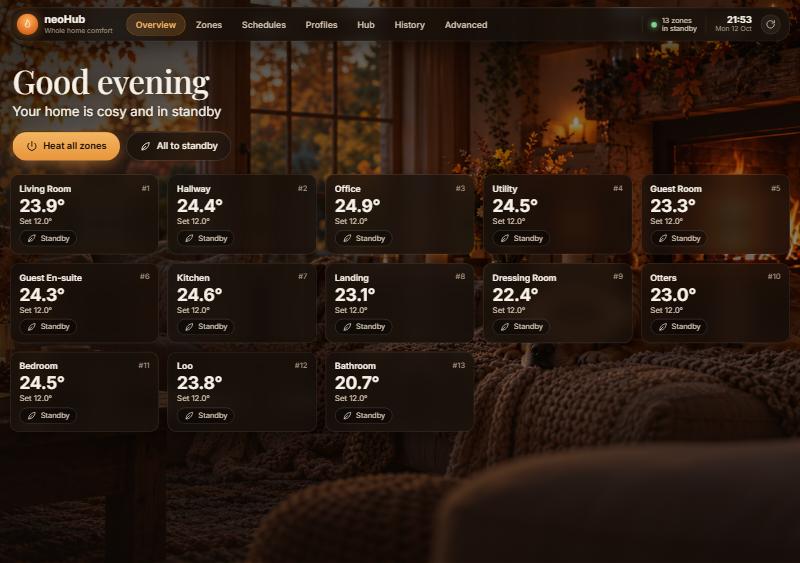
The Overview screen: a greeting, Heat all zones and All to standby buttons, and a card for each room with its temperature
Every room at a glanceOne card per room with the temperature now and the one you asked for.
Works without the internetTalks to your hub directly over home Wi-Fi. No account, no cloud, no outages.
Phone, tablet or PCOpen it in any browser at home, or add it to a phone's home screen.
Finds your hub by itselfNothing to configure. It looks for the hub when it starts and keeps an eye on it.
What you get

A tour of the dashboard

Six screens, one for each thing you might want to do. Screenshots are from a real home with thirteen rooms.

Overview screen with a card per room
Overview

The whole house, right now

The screen you land on. A greeting tells you the state of the house in one line, then every room has its own card.

  • Heat all zones wakes every room up to follow its programme. All to standby rests the whole house, keeping only frost protection on.
  • Each card shows the room's temperature, the target, and whether it is heating, idle or resting. Hover for quick up, down and standby buttons.
  • The dot in the corner is your health light: green when all is well, amber if the hub's clock has stopped syncing, red if a thermostat has dropped off.
Zones

One room in detail

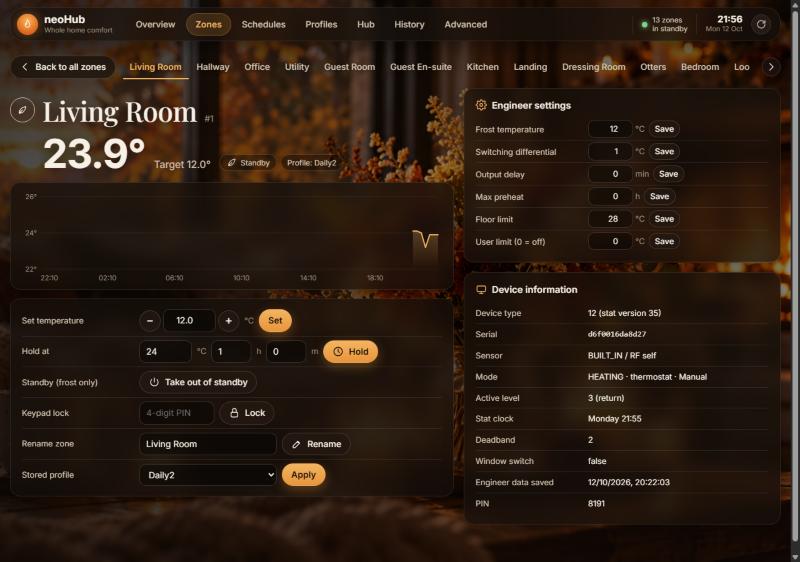
Pick a room from the strip across the top. Everything about it is on one screen.

  • Last 24 hours as a temperature line, so you can see when the room warmed up and how long it held.
  • Set a temperature, hold it for a few hours, put the room in standby, or lock the keypad so little fingers cannot change it.
  • Rename the room and choose which shared programme it follows.
  • Engineer settings for the curious: frost temperature, switching differential and the like, each with its own Save button.
Zones screen for the Living Room with a temperature chart, controls and settings
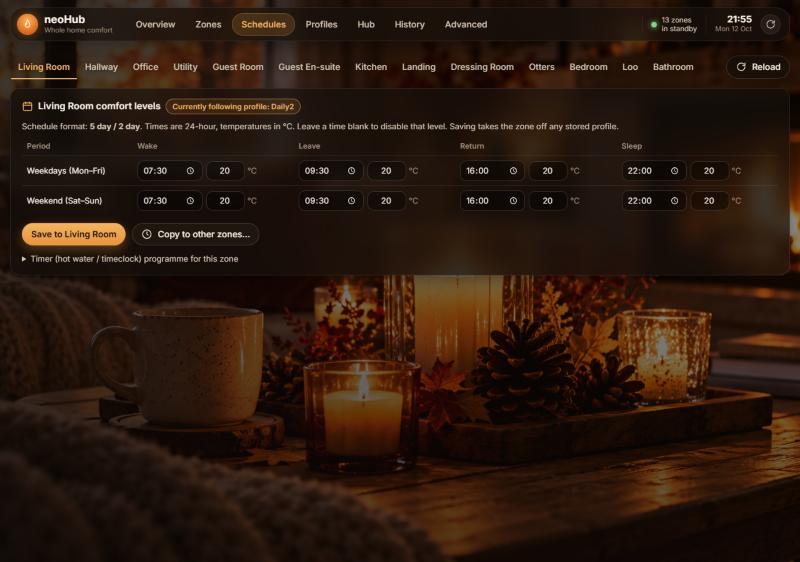
Schedules screen showing weekday and weekend times and temperatures for the Living Room
Schedules

The week's programme for a room

Four moments in the day: wake, leave, return and sleep. Set a time and a temperature for each, for weekdays and for the weekend.

  • Save sends the programme to that room's thermostat.
  • Copy to other zones gives the same programme to any other rooms you pick, so you set it once.
  • A room that follows a shared programme says so. Saving its own times takes it off that programme, and the Zones screen puts it back.
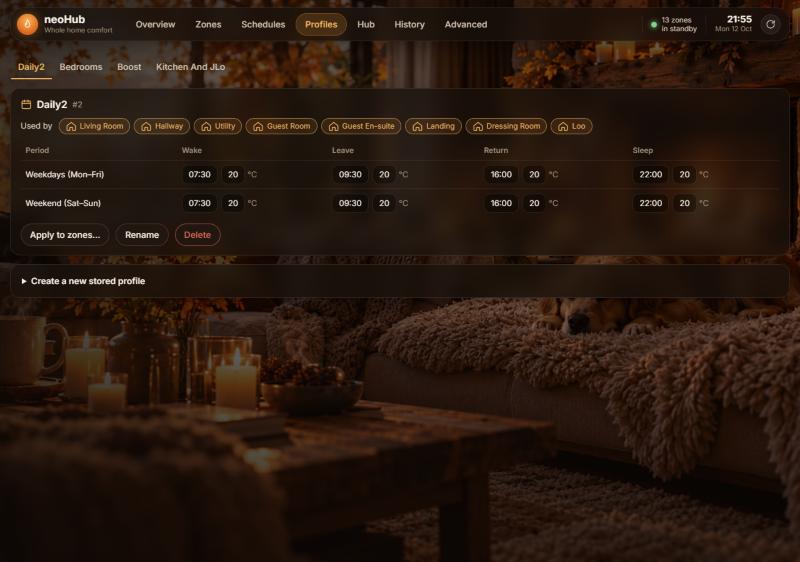
Profiles

Programmes shared by several rooms

Profiles are programmes stored on the hub that many rooms can follow, such as "Bedrooms" or "Boost". Change the profile and every room on it changes.

  • Pick a profile from the strip to see its times and temperatures.
  • Used by shows the rooms following it, so you know who is affected before you touch anything.
  • Apply to zones, Rename, Delete, or store a new one.
Profiles screen showing the Daily2 profile, the rooms that use it, and its programme
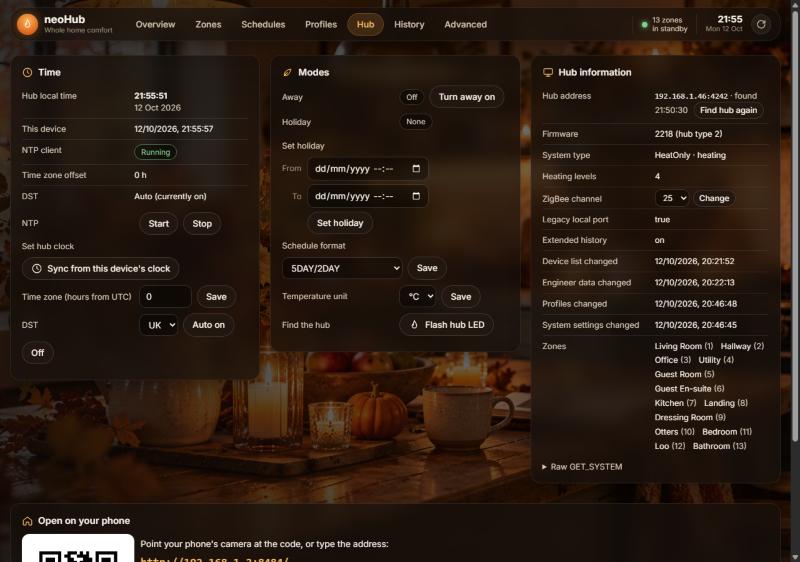
Hub screen with Time, Modes and Hub information panels and the phone QR code
Hub

Whole-house settings

The things you set once and forget, plus the switches for going away.

  • Away for a day out, Holiday with a start and end so the house looks after itself while you are gone.
  • Time: check the hub's clock, fix it with one click, and turn its automatic time sync back on if it has stopped.
  • Find the hub flashes its light so you can spot it in the cupboard.
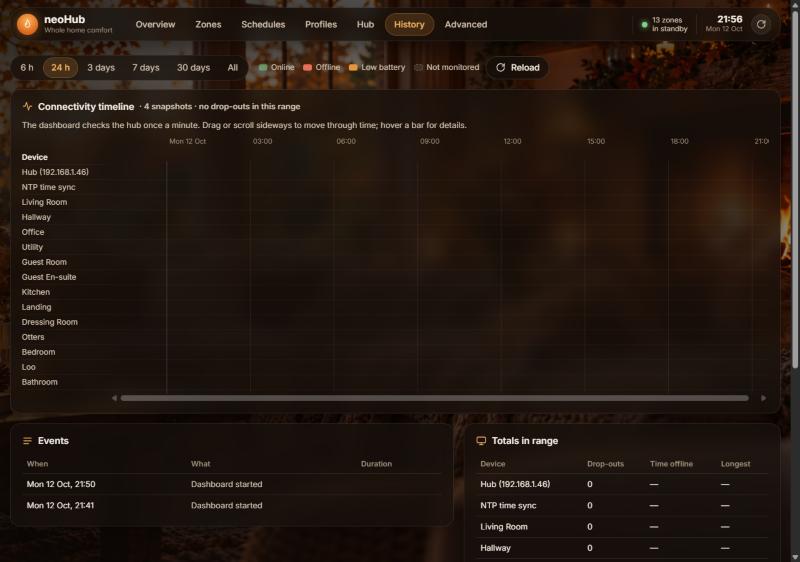
History

Which thermostat keeps dropping off

neoHub checks on the hub and every thermostat once a minute and keeps a diary. History turns that diary into a picture.

  • One bar per device: green while it is online, red when it is not, amber on a low battery.
  • Zoom from the last six hours out to thirty days, and drag sideways to look back in time.
  • A plain list of events such as "Hallway went offline, 29 minutes", and totals per device, so you can tell a flaky thermostat from a flaky hub.
History screen with the connectivity timeline, events list and totals
On your phone

Scan once, then it lives on your home screen

Anyone on your home Wi-Fi can use the dashboard. The easiest way to share it is the QR code: open the Phone link tab on the dashboard, or choose Phone link from the tray icon's menu on Windows.

iPhone or iPad

  1. Open the Camera and point it at the QR code, then tap the link that pops up.
  2. In Safari tap Share, then Add to Home Screen.
  3. Tap the new flame icon. It opens full screen, like an app.

Android

  1. Scan the code with the Camera or Google Lens and open the link in Chrome.
  2. Open Chrome's menu and choose Add to Home screen or Install app.
  3. Tap the icon on your home screen whenever you want it.
Download

Version 1.1.1

Pick the file for the computer that will run neoHub. It only needs to run on one machine in the house; everyone else uses it from a browser.

Windows 10 or 11

neoHub-Setup-1.1.1.exe

18.7 MB · installer

Download

SHA-256 f32bf41b…8fdb33

Raspberry Pi, 64-bit OS

neohub_1.1.1_arm64.deb

18.3 MB · Pi 3, 4, 5 and Zero 2 W

Download

SHA-256 915b042e…3ce231

Raspberry Pi, 32-bit OS

neohub_1.1.1_armhf.deb

18.5 MB · any Pi on 32-bit Raspberry Pi OS

Download

SHA-256 a98e6415…c4d700

Get it for Windows

A small tray app on a PC that stays on

neoHub runs quietly in the system tray, next to the clock. It uses almost no memory and starts with Windows, so the dashboard is always there.

Installing

  1. Download neoHub-Setup-1.1.1.exe and run it.
  2. Windows may show an "unrecognised app" warning because the installer is not signed. Choose More info, then Run anyway.
  3. Leave Start neoHub when you sign in and Allow phones and tablets on your home network ticked, and finish.
  4. The dashboard opens in your browser. The flame icon is now in the tray.

Afterwards

  • Right-click the tray icon for Open dashboard, Phone link, Find hub again, Start with Windows and Quit.
  • Updating is just running the new installer. Your history is kept.
  • Removing it is the usual Apps and features route.
Get it for Raspberry Pi

Or a Raspberry Pi tucked away next to the router

A Pi makes a good home for neoHub because it is always on and uses almost no power. Any Pi 3, 4, 5 or Zero 2 W running the 64-bit version of Raspberry Pi OS will do.

Installing

  1. Download neohub_1.1.1_arm64.deb and copy it onto the Pi, or fetch it on the Pi itself with wget using this page's download link. (On a 32-bit system use the armhf file instead.)
  2. In a terminal on the Pi, in the folder the file is in, run:
    sudo apt install ./neohub_1.1.1_arm64.deb
  3. That is it. neoHub starts straight away and every time the Pi boots. The installer prints the address to open, usually http://raspberrypi.local:8484/.

Afterwards

  • Phones: run neohub phone on the Pi to draw the QR code in the terminal, or open the Phone link tab on the dashboard.
  • Checking on it: neohub status shows the hub it found and the dashboard address.
  • Updating: run the same install command with the new file.
  • Removing: sudo apt remove neohub.
Good to know

Questions people ask

Does it need the internet?

No. It talks to the hub over your home Wi-Fi, so it keeps working if your broadband goes down. The Heatmiser app keeps working too; both can be used side by side.

What does "standby" mean?

The room stops following its programme and only comes on if it gets very cold, around 12 °C, to protect the pipes. "Heat all zones" or the room's own button wakes it up again.

Can other people in the house use it?

Yes, anyone on your Wi-Fi. There is no login, so it stays on the home network and is not reachable from outside.

Why is a room showing a flat line or gaps in its chart?

Thermostats keep one reading every 15 minutes for the last day. After a thermostat re-joins the hub the chart refills over the next 24 hours.

Why did my new profile end up with the same times every day?

A quirk of the hub: when a new profile is stored it copies the weekend row over the weekday row. The form warns you. Rooms' own schedules are not affected.

Something on the Hub screen says the time sync stopped. Is that bad?

It means the hub's clock may drift and programmes slowly run late. One click on Start fixes it, and the History screen shows how often it happens.